


Aron Kantor
Founder

Share the article
Enjoy this article?
Share it with someone who needs better focus.


TL;DR
- Biggest strength: Affordable pricing and a practical combination of task management and Pomodoro sessions.
- Biggest weakness: Limited focus insights and inflexible app blocking.
- Choose Focus To-Do if: You want a simple, budget-friendly app to manage tasks and reduce distractions.
- Skip Focus To-Do if: You need open-ended focus sessions, advanced screen time controls, or personalized focus insights.
- Bottom line: Focus To-Do is a budget-friendly Pomodoro app, but it lacks the flexibility of more advanced focus apps.
During my Focus To-Do review, it outperformed my expectations, and I found it works best if you want something simple and budget-friendly to reduce distractions.
If you need more advanced features (focus insights, open-ended focus timer, control over app blocking, etc.) or a beautiful user interface, Focus To-Do might disappoint you.
Below, I’ll break down what Focus To-Do does best, where it falls short, and whether it’s worth using based on my hands-on experience.
What is Focus To-Do?
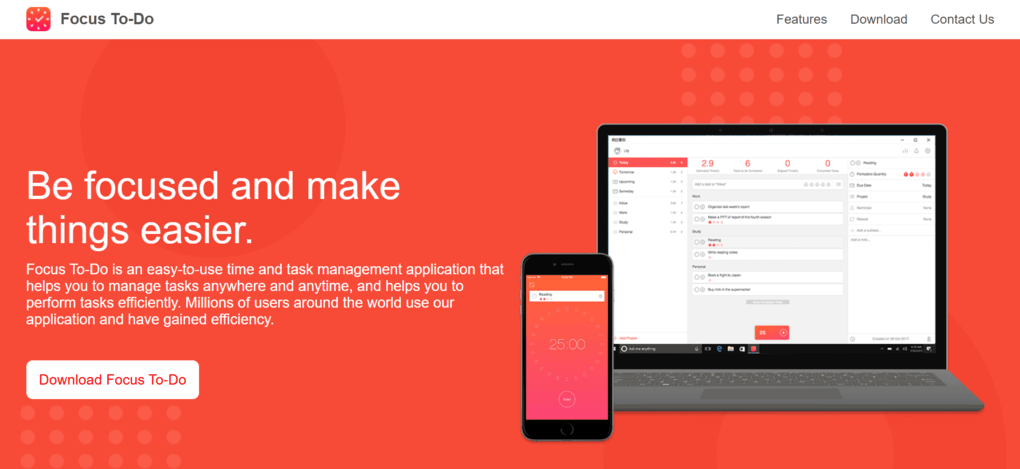
Focus To-Do is a Pomodoro timer and task management app available on Mac, Windows, Android, iPhone, and iPad, as well as a Chrome extension.
Launched in 2017, it uses the Pomodoro Technique as its core approach to time management, encouraging users to work in focused intervals followed by short breaks.
Beyond its Pomodoro timer, Focus To-Do offers app blocking, soundscapes, and productivity statistics to help users minimize distractions and stay on top of their tasks.
Key Takeaways From My Testing
- Excellent value for money: With a decent free plan and a lifetime license costing around $11.99, Focus To-Do is one of the most budget-friendly apps I’ve tested.
- Task management and focusing work well together: I particularly liked that I could start a Pomodoro session directly from a task, reducing the friction between planning and getting things done.
- Easy but inflexible app blocking: Setting up app blocking took me only a few seconds. However, you can only block apps during focus sessions, without custom schedules or advanced blocking rules.
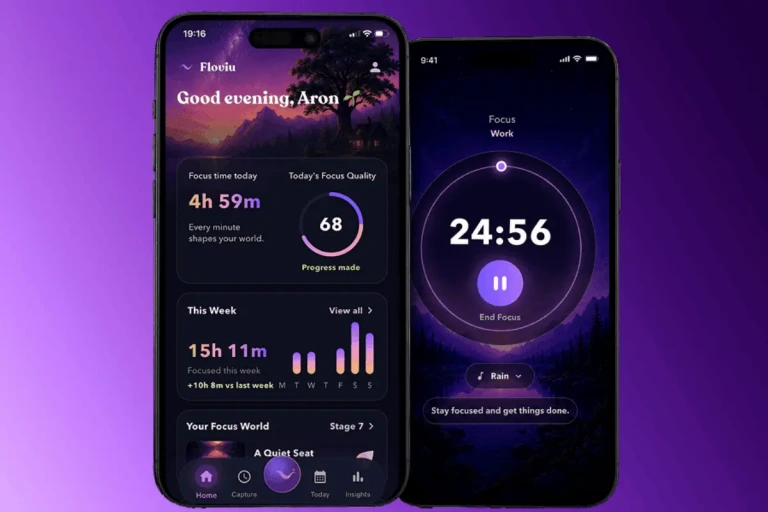
- Limited flexibility and focus insights: Unlike Floviu, Focus To-Do lacks an open-ended focus timer and deeper insights into your focus patterns. It helps you track how much you focus, but not necessarily how to focus better.
What I Loved & What Could Be Better
| What Focus To-Do Does Best | Focus To-Do’s Biggest Drawbacks |
| Pomodoro timer combined with app blocking, task management, and soundscape | No option to start the timer without a length for a task that you don’t know when to finish |
| A straightforward app without learning curve | To change the language of Focus To-Do, you need to change your mobile device’s language |
| Unlike Opal or one sec, you can block apps within a few seconds | No focus insights or trends |
| Offers numerous soundscapes | No transparent pricing information on the website |
| Groups are a good idea to motivate each other | App blocking included only in the Pro plan |
| Budget-friendly solution for task management and focusing | Unflexible app blocking |
| No calendar events/integrations |
Is Focus To-Do Worth It?
Focus To-Do has a decent free version that gives you access to the core features, such as a Pomodoro timer, task management, and a few soundscapes.
Paid plans typically cost around $1.99/month, $3.99 for 3 months, $9.99/year, or $11.99 for a one-time lifetime license, depending on the platform and region.
There are no transparent pricing plans on the website, and you only see the prices when you upgrade. Personally, I prefer to know the prices before even investing time to sign up for an app, so that’s a negative point for me.
This is what you get with the Premium plan:
| Key features | Free | Premium |
|---|---|---|
| Pomodoro timer | Yes | Yes |
| Tasks, subtasks, and projects | Yes | Yes, plus unlimited folders |
| Due dates and priorities | Yes | Yes |
| Soundscapes | Only a few | Yes, unlimited |
| Basic statistics | Yes | Yes |
| App blocking | No | Yes |
| Cross-device sync | No | Yes |
| Detailed analytics | No | Yes |
| Custom themes | No | Yes |

Good to Know: Not every focus app requires a paid subscription for app blocking. Floviu’s free plan includes flexible focus timers, all soundscapes, and multi-app blocking during focus sessions.
Who Should Use Focus To-Do?
Ideal: You want a simple, budget-friendly app that combines a Pomodoro timer, task management, and app blocking without a steep learning curve.
Consider carefully: You need app blocking to reduce screen time and change phone habits, as Focus To-Do only blocks distracting apps during focus sessions and lacks flexible blocking rules.
Avoid: You need open-ended focus sessions, personalized focus insights, or advanced app blocking to build better focus habits over time.
Pomodoro Timer: Customizable but Rigid
Feature rating: B
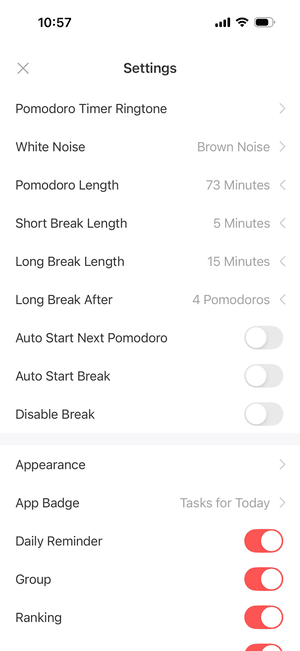
The focus timer is built around predefined session lengths, so there’s no open-ended option for tasks when you don’t know how long you’ll be working.
When I use Floviu, I normally use open-ended sessions because I don’t know how long it will take to complete a task. So, choosing only predefined session lengths was a huge limitation for me.
Focus Tip: If you struggle to estimate how long a task will take, try an open-ended focus timer. It removes the pressure of a countdown and allows you to stay in flow without interrupting productive moments.
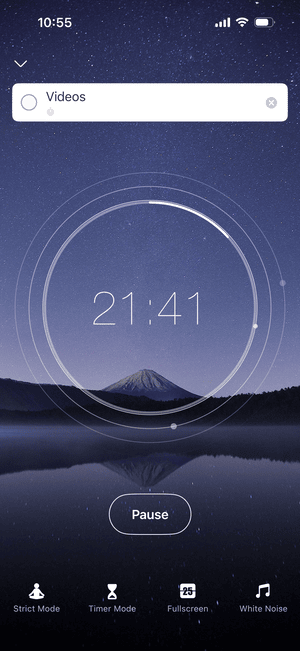
Nevertheless, I liked the option to schedule short and long breaks. You got full control over how many Pomodoros and breaks you need for a specific task.
On the negative side, I didn’t find this solution intuitive, as I needed to set this every time I started a task. For example, I would appreciate predefined templates.
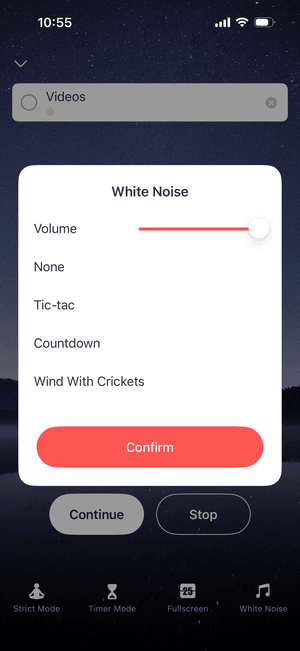
Furthermore, you can apply soundscapes and adjust volume. While most soundscapes are included in the paid plan, you also get access to a few in the free version.
App Blocking: Easy but Inflexible
Feature rating: C-
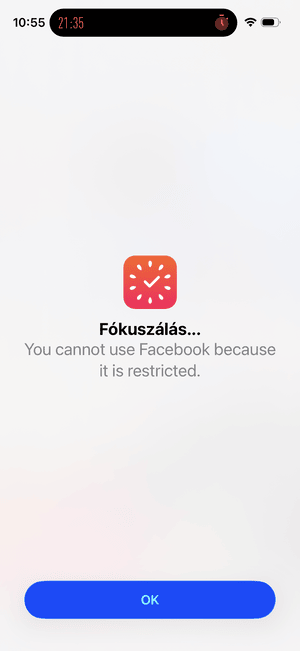
Blocking is really easy to set up. You simply choose which apps distract you, start a focus session, and Focus To-Do keeps those apps out of reach while you’re working.
So instead of blocking apps throughout your entire day, it works particularly well if your screen-time problem happens when you’re trying to get something done.
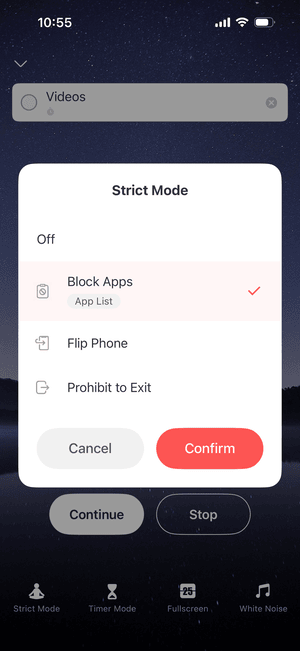
What I didn’t like is the lack of flexibility around app blocking. For example, you can’t set specific time periods or rules for when you want to block notifications from distracting apps and avoid opening them.
Also, only strict blocking is available, and there is no option for soft blocking like with one sec or Floviu’s Android version.
Focus Tip: If your goal is to change your phone habits rather than temporarily restrict access to apps, consider soft blocking. Creating a moment to reflect before opening a distracting app can help you become more aware of automatic scrolling habits.
Task Management: Practical, but Less Intuitive Than Todoist
Feature rating: B-
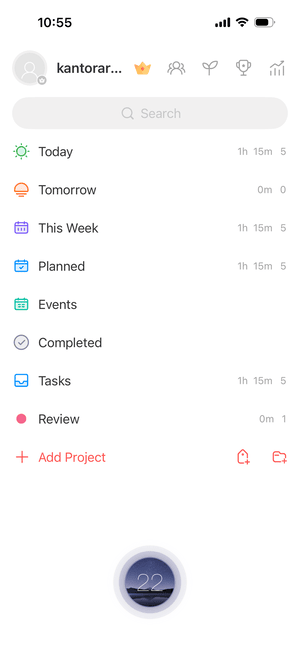
Task management’s key features include tasks, priority, due dates, subtasks, and tags. Managing tasks works similarly to Todoist, although as a massive Todoist user, I find it more intuitive than Focus To-Do.
I appreciated that you can start the focus timer directly from tasks. It reduces the friction of adding tasks and starting to focus.
Moreover, you can create projects in Focus To-Do. Inside your projects, you can add related tasks, and Focus To Do shows basic statistics about your project, such as estimated time, unfinished tasks, completed tasks, and hours spent on these tasks.
Statistics, Groups, and Other Features: Good Addition
Features rating: B
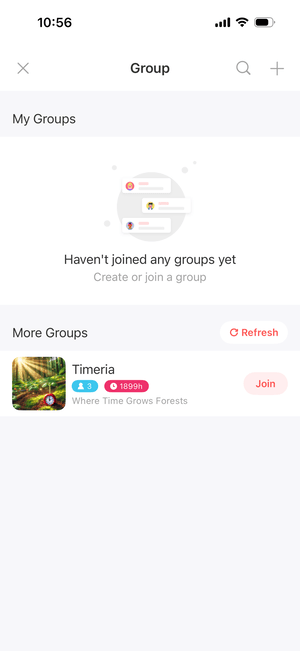
I like the Groups feature, where you can focus alongside other people for some extra accountability. You can make it private or open, and it shows the time you focused with your group members.
However, searching for groups wasn’t very practical, and you can only join groups that you already know the name of.
You can also access basic statistics about your time spent on projects, tasks, and Pomodoro sessions. These are useful for seeing how far you’ve come and which tasks and projects took most of your time, but they’re too basic to learn how to improve and what works best for your mind, especially if you deal with ADHD.
Did You Know? More focused time doesn’t necessarily mean better focus. Tracking your focus quality alongside session lengths, distractions, and environmental factors can help you discover why some days feel effortless while others feel like a constant struggle.
Besides these features, Focus To-Do offers achievements and focus rankings. If that’s something that motivates you, it can be a nice addition.
What Do Real Everyday Users Think of Focus To-Do App?
| Platform | Rating | Based On | Common Complaints |
|---|---|---|---|
| App Store | 4.8 | +15.000 reviews | No calendar integration |
| Play Store | 4.6 | +290.000 reviews | Many glitches |
| – | Reddit threads | Occasional bugs and app issues |
Comparing Focus To-Do Alternatives
| App | Pomodoro Timer | Task Management | Price | Best For |
|---|---|---|---|---|
| Focus To-Do | Yes | Yes (tasks, subtasks, and projects) | Free / $9.99 per year / $11.99 lifetime | Budget-friendly Pomodoro timer and task management |
| Floviu | Yes (plus open focus without countdown) | Yes | Free / $69.99 per year | Deep work and understanding your focus patterns |
| Forest | Yes | None | Free / $35.99–$59.99 per year | Gamified focus sessions and motivation |
| Wisey | Yes | Basic | From $34.99/12 weeks, renewing at up to $99.99/12 weeks | Overcoming procrastination and building habits |
| Opal | Basic focus timer | None | Free / $99.99 per year | Strict app blocking and screen time control |
| Todoist | No native timer | Advanced | Free / Pro plan | Everyday task management and organization |
Focus To-Do vs. Alternatives
This is how Focus To-Do compares to other popular focus timer apps:
Focus To-Do vs. Floviu
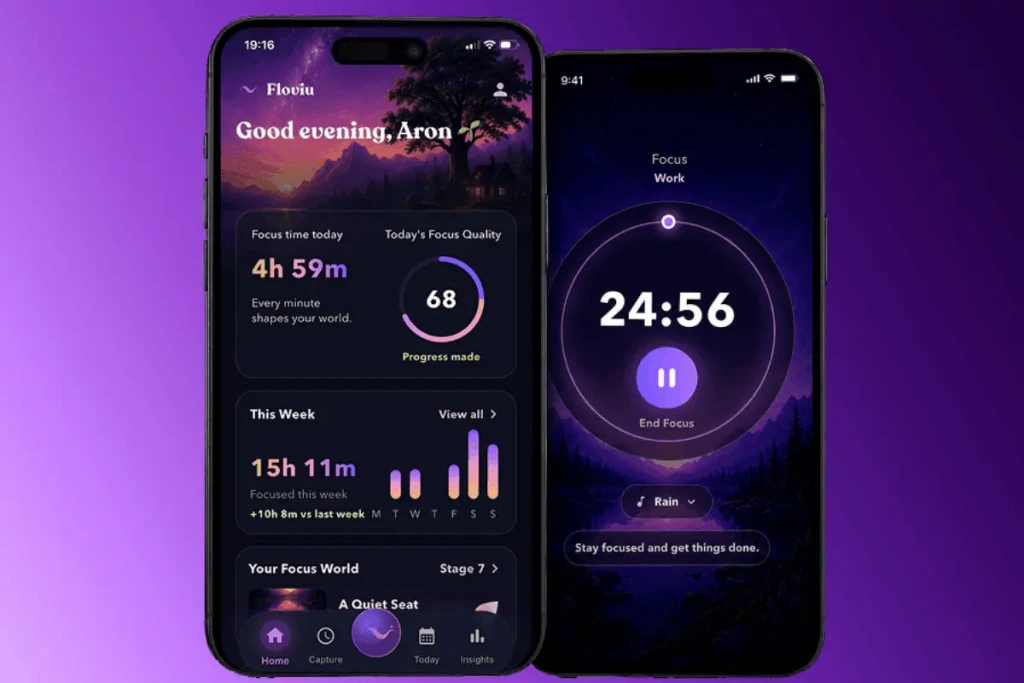
Floviu offers more flexibility with its open-ended focus timer, advanced app blocking, and deeper insights into what helps you focus better.
However, Focus To-Do is cheaper and offers more comprehensive task management features, including subtasks and projects.
Focus To-Do vs. Forest
Forest makes focus sessions more engaging through gamification, virtual trees, and visual rewards, making it a better choice if you struggle with getting started.
Focus To-Do is more affordable and practical for managing tasks, organizing projects, and customizing Pomodoro sessions.
Focus To-Do vs. Wisey
Wisey is more than a Pomodoro timer, offering habit tracking, daily productivity check-ins, and educational content to help you overcome procrastination.
Focus To-Do offers more comprehensive task management at a fraction of the price, without Wisey’s reported subscription and billing issues.
Focus To-Do vs. Opal
Opal has significantly more advanced app blocking features, including scheduled blocking, daily time limits, and app opening limits. It also has a more polished user interface.
On the other hand, Focus To-Do is much more affordable and better suited for combining task management with structured focus sessions.
Focus To-Do vs. Todoist
Todoist offers a more intuitive task management experience, with natural language task creation, recurring tasks, advanced filters, and numerous integrations. However, if your main priority is not organizing tasks, Todoist falls short.
Focus To-Do is a better choice if you want to combine task management with a built-in Pomodoro timer, soundscapes, and app blocking without relying on multiple apps.
Focus To-Do Review: Final Thoughts
Focus To-Do offers a practical combination of task management and the Pomodoro Technique. I particularly liked how easily I could switch from organizing my tasks to starting a focus session, making it a straightforward tool for getting things done.
While both core features work well, I missed some capabilities that I would expect from a more comprehensive focus app, such as an open-ended focus timer, flexible screen time controls, and focus insights.
All things considered, I think Focus To-Do deserves its place among the best Pomodoro apps despite these limitations. Its affordable pricing, simplicity, and solid task management features make it an excellent choice for anyone looking to reduce distractions without overcomplicating their daily routine.
Frequently Asked Questions
How Much Does Focus To-Do Cost?
Focus To-Do offers a free plan and a Premium version that typically costs $1.99 per month, $3.99 for three months, $9.99 per year, or $11.99 for a lifetime license. However, pricing may vary depending on your platform and region.
This is one of the negative points I found during my Focus To-Do review, since I would appreciate more transparent communication about pricing plans.
Which Pomodoro App Is The Best?
Floviu is a great choice if you want a flexible Pomodoro timer, advanced app blocking, and personalized focus insights. Focus To-Do is ideal for budget-friendly task management and structured focus sessions, while Forest is a great alternative if gamification helps you stay motivated.
Is Focus To-Do App Free?
Focus To-Do offers a free version that includes a Pomodoro timer, task management, basic statistics, and a few soundscapes. However, features like app blocking, cross-device synchronization, and additional soundscapes require a Premium subscription.
Is Pomodoro Technique Good or Bad For ADHD?
The Pomodoro Technique can help people with ADHD by breaking overwhelming tasks into manageable intervals and supporting regular breaks. It can also help to reduce procrastination and get started. However, rigid session lengths can interrupt periods of deep concentration or hyperfocus.
A more flexible approach, such as customizable session lengths or an open-ended focus timer, may work better for some people with ADHD.
In this article
- What is Focus To-Do?
- Key Takeaways From My Testing
- What I Loved & What Could Be Better
- Is Focus To-Do Worth It?
- Who Should Use Focus To-Do?
- Pomodoro Timer: Customizable but Rigid
- App Blocking: Easy but Inflexible
- Task Management: Practical, but Less Intuitive Than Todoist
- Statistics, Groups, and Other Features: Good Addition
- What Do Real Everyday Users Think of Focus To-Do App?
- Comparing Focus To-Do Alternatives
- Focus To-Do vs. Alternatives
- Focus To-Do vs. Floviu
- Focus To-Do vs. Forest
- Focus To-Do vs. Wisey
- Focus To-Do vs. Opal
- Focus To-Do vs. Todoist
- Focus To-Do Review: Final Thoughts
- Frequently Asked Questions
- How Much Does Focus To-Do Cost?
- Which Pomodoro App Is The Best?
- Is Focus To-Do App Free?
- Is Pomodoro Technique Good or Bad For ADHD?