


Freedom App Review (2026): Good for Blocking, Limited for Focus
Chances are, you’re reading this Freedom app review to find out whether it can actually help you stay focused and block distracting apps.
To answer that, I used Freedom for a week to see how well it reduced my screen time, kept distractions away, and helped me stay on track.
Freedom turned out to be good at stopping me from opening distracting apps although not everyone has had the same experience (more on that below).
After a week with Freedom, my answer is a clear no—and that’s where its biggest limitations start to show.
What is the Freedom app?

Freedom is an app blocker for Mac, Windows, iOS, and Android that aims to help you avoid distracting websites and apps across all your devices. It was created in 2008-2009 in the US, and since then it’s one of the most popular productivity apps for blocking apps.
Quick verdict by use case
Ideal: Freedom is a good choice if you want a powerful, easy-to-use blocker across multiple devices.
Consider carefully: If you need a more advanced focus timer like Floviu’s, or task management features.
Avoid: If you want more than just an app blocker and want to understand why your distractions happen and how to build lasting focus habits.
What it’s like using Freedom for blocking apps?
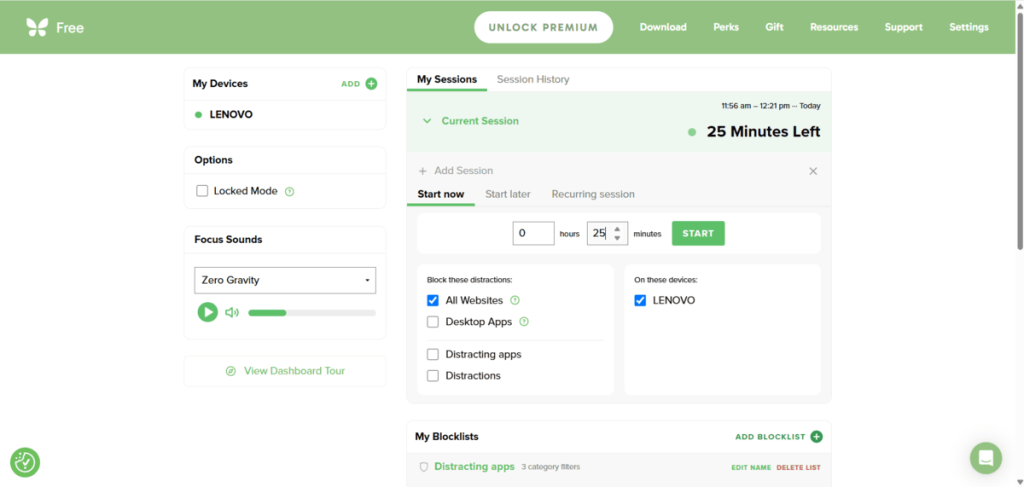
What I really like about Freedom is how versatile it is. You can block distracting apps and websites across your phone, computer, and other devices, and the setup is much easier than with One Sec.
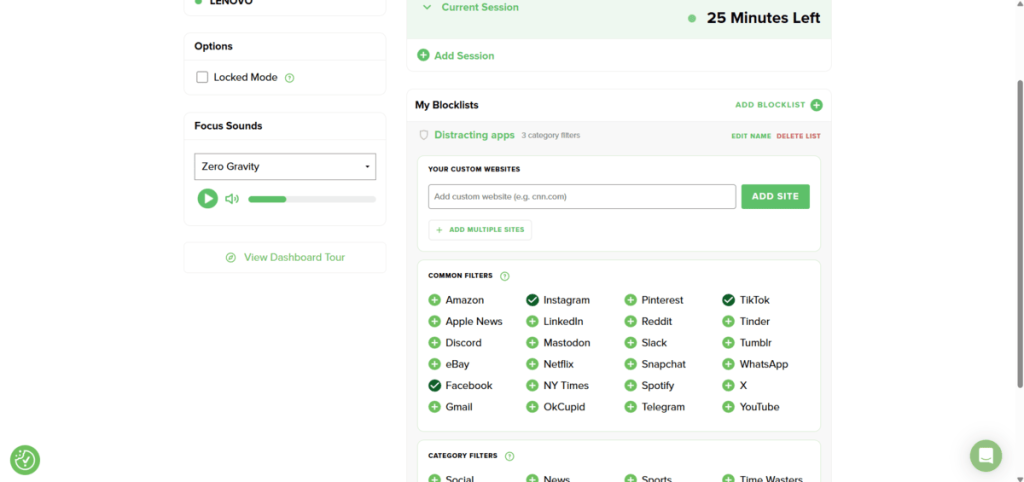
You can create your own custom blocklists, or simply use predefined categories if you want to get started quickly. And you can schedule recurring sessions around your work hours, specific days, or habits, so once everything is set up, Freedom can handle a lot of the blocking automatically.
And if you really don’t trust yourself, there’s even a Complete Internet Block, which basically removes the temptation altogether.
Also, Freedom has a locked mode that prevents you from editing your block list and devices during a session. So, if you are dealing with heavy phone addiction, this might be an ideal solution to completely block distractions.

Tip: If you tend to bypass your own blocking rules, try Locked Mode for your most important focus sessions. Just double-check your blocklist before starting—you won’t be able to change it until the session ends.
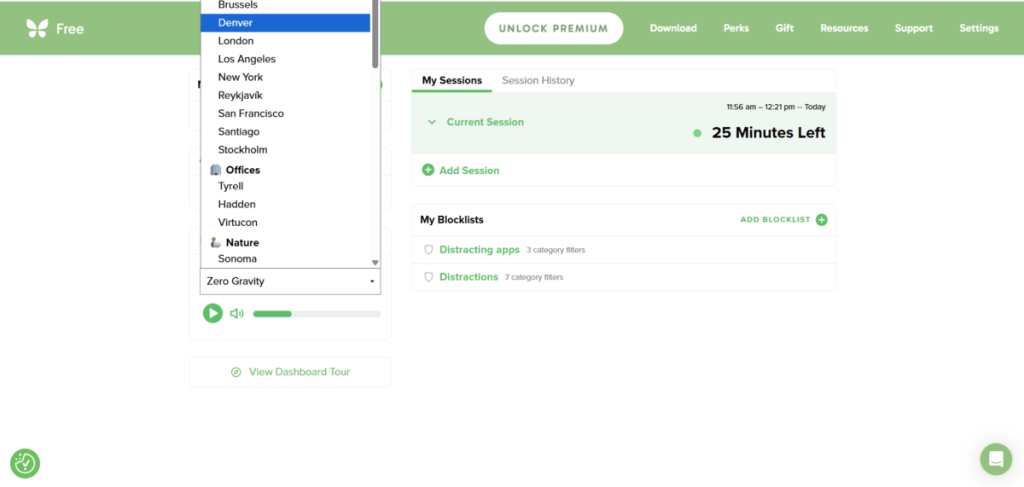
Freedom also includes a nice selection of focus soundscapes, which is something I always appreciate in a focus app.
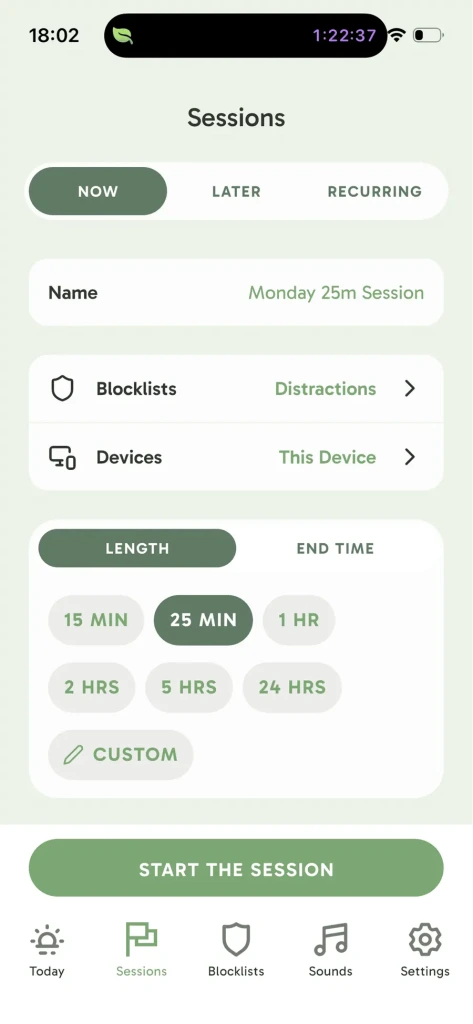
But Freedom is primarily a distraction blocker, and that’s also its biggest limitation for me.
The focus timer is fairly basic; there’s no option for open-ended focus sessions, and you don’t get meaningful insights into when or how you focus best.
And because Freedom relies mostly on hard blocks, it does a great job of removing distractions, but doesn’t really help you understand why you keep reaching for those distractions in the first place.
What impressed me about Freedom during testing
| What I liked | Why? |
| Versatile cross-device blocking | Many screen time apps focus on either mobile or desktop. Freedom lets you block distracting apps and websites across multiple devices. |
| Easy setup | Compared with blockers like One Sec, I found Freedom much quicker to set up and easier to learn. |
| Customizable blocking list | You can quickly choose which apps and websites to block or use predefined categories to save time. |
| Variety of soundscapes | Freedom offers a good selection of focus sounds, which is a nice addition compared with many other blocking apps. |
| Recurring events | It offers custom recurring blocklists for specific work hours, days, or habits. |
| Locked mode for the complete internet | You can block the entire internet with a few clicks. |
Where Freedom fell short
| What frustrated me | Why? |
| No advanced focus timer | Freedom’s timer feels limited compared with dedicated focus apps like Floviu or Focus To-Do. |
| No option for open focus sessions | You always need to choose how long you want to focus beforehand. I prefer having an open-ended option when I don’t know how long a task will take. |
| No insights about your sessions | Freedom doesn’t really show whether your focus is improving or help you understand when, where, or how you focus best. |
| Treat the symptoms and not the reason | Hard blocking removes the immediate distraction, but it doesn’t help you understand why you keep reaching for distracting apps in the first place and you don’t have a chance to reflect. |
| Mobile app inconsistency | Some Freedom users complained on Reddit about the mobile version as it can feel clunky, cause battery drain due to its local VPN setup, or fail to prevent you from physically opening blocked apps. |
Freedom features & how I would grade them
| Feature | Grade | Key Takeaway |
| Core Blocking Features | B- | Hard blocking worked well during my testing, although I missed having a soft-blocking option. I also found several user complaints about mobile blocking. |
| Scheduling | A | Setting up recurring blocking sessions is quick and easy. This is one of Freedom’s strongest features. |
| Focus Sounds | B+ | Freedom offers a good variety of focus sounds compared with most screen time apps. However, I didn’t find the sound quality as immersive as Endel. |
| Focus Features (Timer, Insights, etc.) | F | Freedom is primarily an app blocker, so its focus tools are very limited. The basic timer and lack of focus insights leave plenty of room for improvement. |
Freedom’s free vs paid plans
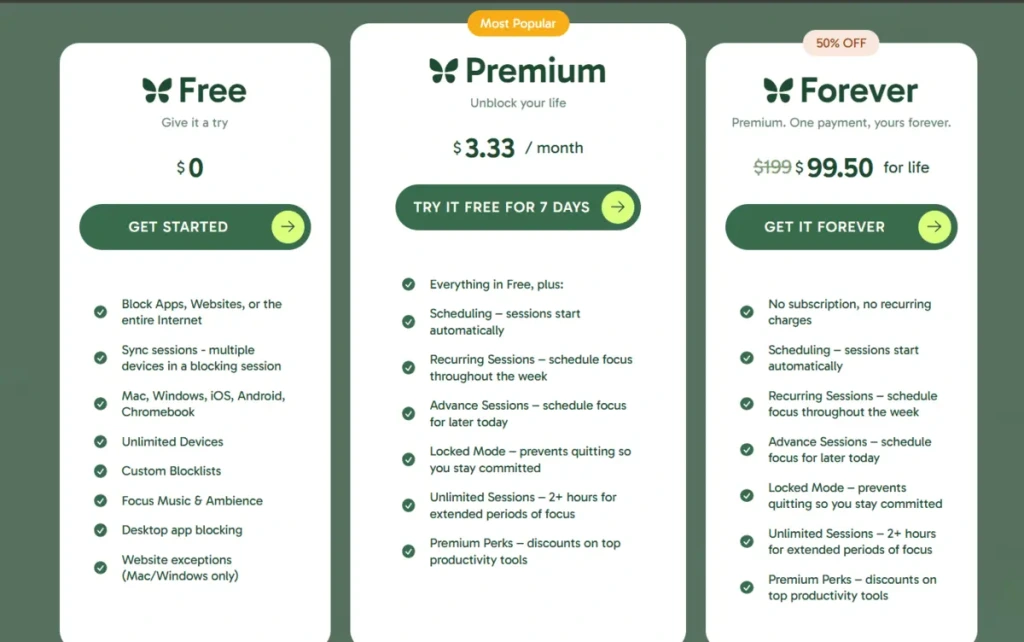
With the free version, you can block apps, websites, or the entire internet on unlimited devices, including Mac, Windows, iOS, Android, and Linux. You also access custom blocklists and focus sounds.
However, you need to upgrade to block apps for longer than 2 hours. Furthermore, you can schedule recurring events only with the Premium or Forever plans, and you must pay to access the locked-mode features.
What do real everyday users think of Freedom?
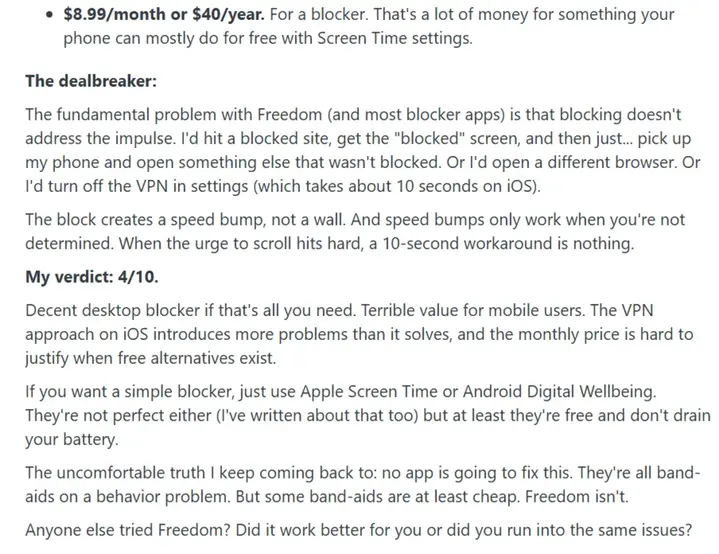
Reddit user Dangerous-Project874 gave Freedom a 4/10, arguing that blocking distractions doesn’t address the underlying impulse to scroll. They found it too easy to work around blocks by switching apps, browsers, or disabling the VPN.
They also felt the price was difficult to justify when built-in alternatives like Apple Screen Time and Android Digital Wellbeing are free.
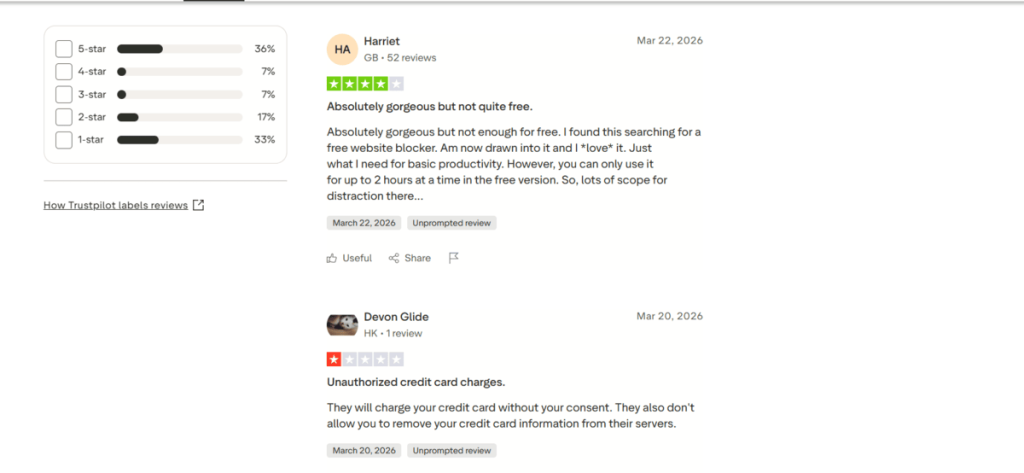
When I checked Freedom’s Trustpilot reviews, I was surprised to see a score of just 2.8 out of 5, which is significantly worse than my own experience with the app. Two reviews in particular caught my attention:
- Harriet (4/5) loved Freedom’s design and found it useful for basic productivity and website blocking. However, she felt the free plan was too restrictive because sessions are limited to two hours at a time.
- Devon Glide (1/5) reported a much more serious issue, alleging an unauthorized credit card charge and saying they were unable to remove their card information from Freedom’s servers.
Overall, the reviews are quite mixed: some users praise Freedom for effectively reducing distractions and breaking distraction loops while others report that the blocks are too easy to bypass or inconsistent across devices.
So, the main takeaway is this: Freedom can be a powerful blocker, but hard blocking alone won’t work equally well for everyone.
Top Freedom alternatives: Quick comparison
| Focus app | Best for | Starting price (annual plan) |
| Floviu | A complete focus app for deep work | Free includes soft blocking, yearly plan is $69.99 |
| Opal | Strict screen-time blocking | $99.99 yearly |
| One Sec | Breaking automatic app-opening habits | $19.99 per year |
| Forest | Students or users need gamified Pomodoro sessions | Free, $3.99 one-time purchase |
| Focus To-Do | Pomodoro + task management | Free, $11.99 lifetime license |
| Cold Turkey | Strict PC blocking | One-time payment of roughly $45 |
| ScreenZen | Free screen-time reduction | Free |
How Floviu is different from Freedom
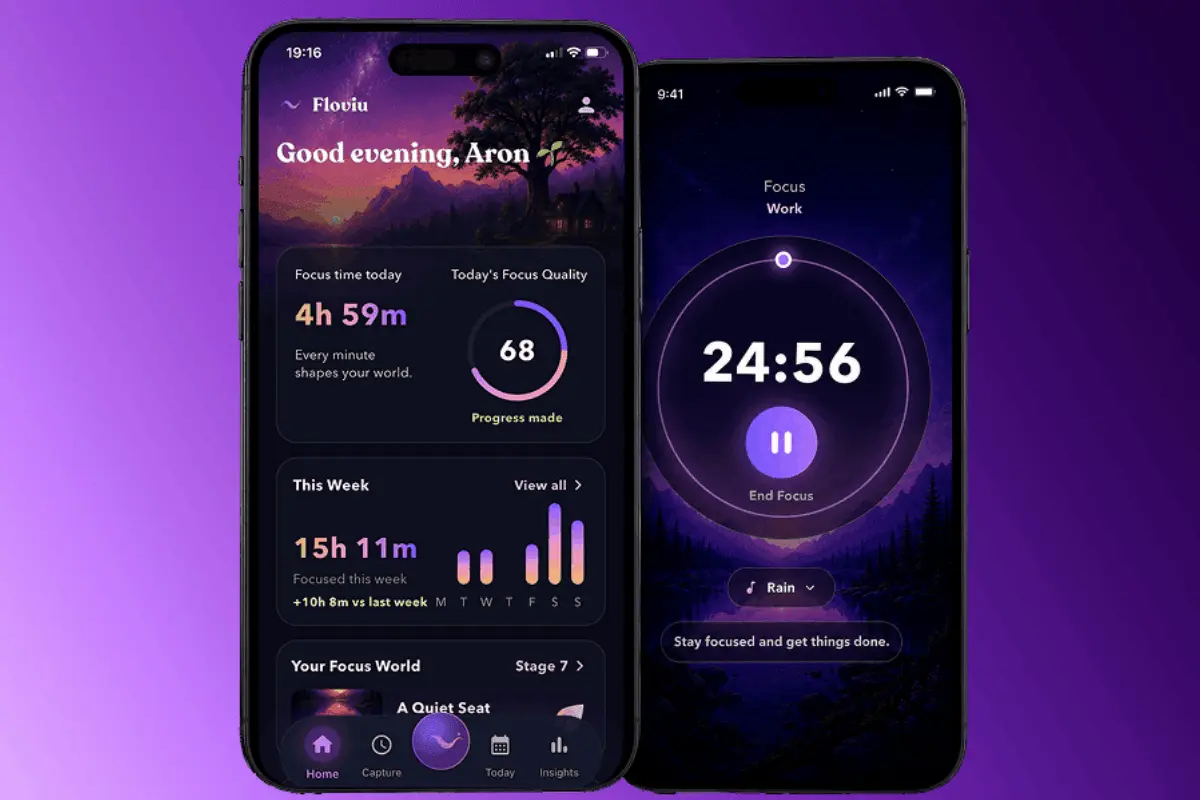
Floviu takes a different approach from Freedom. Instead of relying mainly on hard blocking, it combines gentle distraction protection with focus sessions and insights to help you understand your focus patterns.
Would I recommend Freedom?
Despite some of the negative reviews, I think Freedom is a solid choice for blocking distracting websites and apps. Freedom Premium offers good value if you want a strict blocker that works across multiple devices.
However, if you want more than simply removing distractions, Freedom may feel limited. There are no meaningful focus insights or an advanced focus timer, and its hard-blocking approach mainly tackles the symptom of distraction rather than helping you understand why you keep getting distracted in the first place.
Frequently Asked Questions
Is the Freedom app safe to use?
Based on my research, yes, Freedom is safe. It does not track or record your browsing or app behavior on desktop or mobile devices. Also, it’s safe from malware or spyware.
Is Freedom app worth the money?
Freedom is worth the money if you need a strict app and website blocker with cross-device syncing. Nevertheless, if you also want advanced focus tools, insights, or help with understanding your distraction habits, I recommend skipping Freedom.
How does the Freedom app work?
Freedom blocks selected websites, apps, or the entire internet on your desktop and mobile devices. In locked mode, you can’t change settings during focused time.
What is the best app for blocking social media?
The best app for blocking social media depends on how strict you want the blocking to be. Floviu is best for gentle blocking and understanding your distraction habits; One Sec is great for interrupting automatic app opening, while Opal is a better choice if you want stricter screen-time restrictions.